How to autoregulate a client's training load
Updated July 26, 2026
Adding 2.5 kg every week is a guess dressed up as a plan. Some weeks the client had five reps in the tank; some weeks they scraped the last one. Autoregulation reads what actually happened — the reps they logged and how hard it felt — and tells you what to do with the load next time.
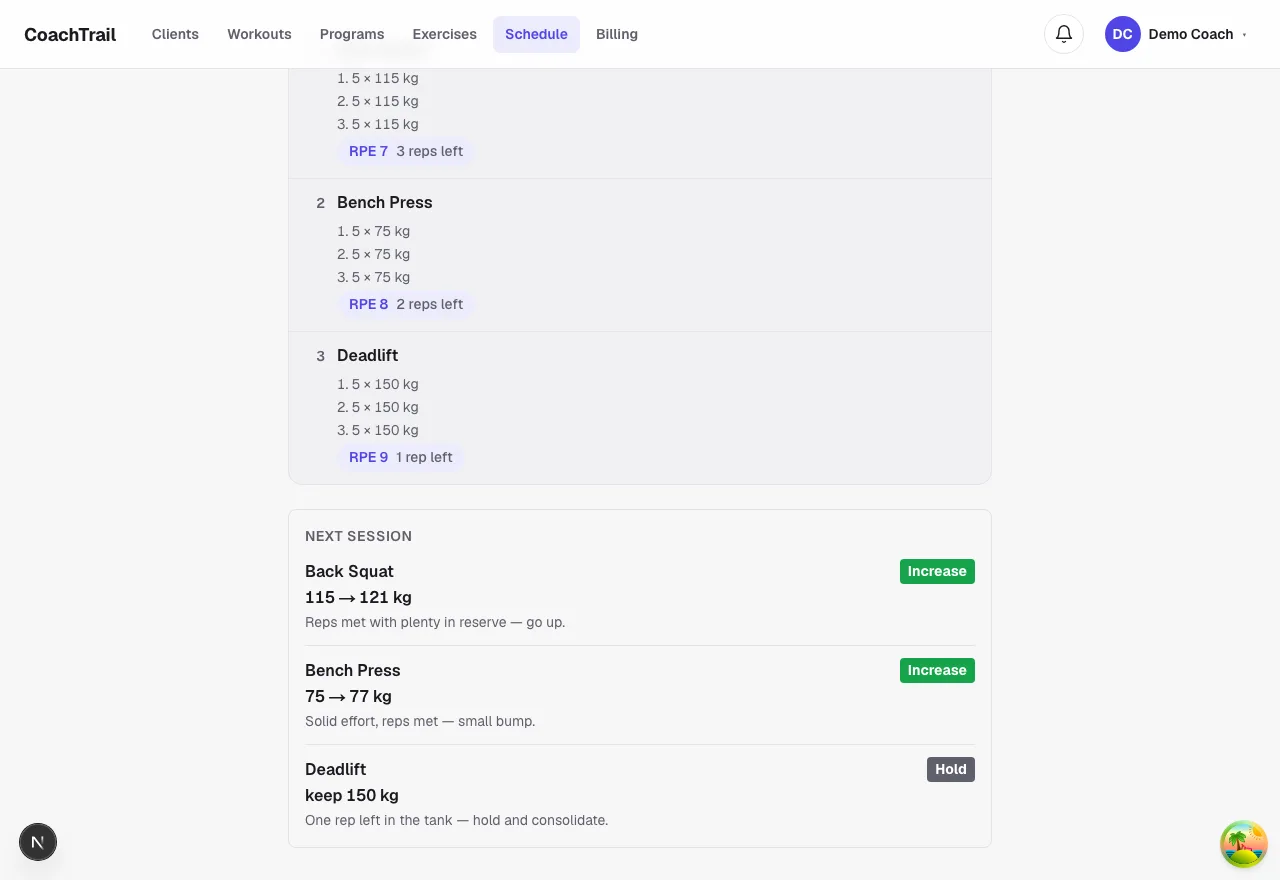
The client already gave you the answer
After a set the client says how many reps they had left; you read it back as an RPE. Reps met with three in reserve is a green light to go up. Reps met at RPE 9 means hold and own the weight first. Missed at a maximal effort means back it off. It is coaching judgement, applied the same way every time.
A suggestion, not an autopilot
CoachTrail proposes the next working weight per exercise, with the reason in plain words. You decide — it informs your edit of the next session rather than rewriting anything behind your back. The number is always recomputed from what the client logged, so it can never drift.
Rough days do not earn a bump
If the client rated their readiness low before the session, an increase is held back to a hold — you do not chase a PR on the day someone slept four hours. That one rule keeps the progression honest across good weeks and bad.
In CoachTrail the next-session call sits on every completed practice, built from data you already collect. Create your coach account and let the next-session call do the small thinking for you.